If your business runs on Cloudflare, there’s a chance your website has gone dark in AI-powered search tools like ChatGPT, Claude, Perplexity, and, to some extent, Google’s AI Overviews. This is because of recent changes made by Cloudflare, and if you’re not aware of what’s happened, you might be in need of an audit.
This is an incredibly common problem because Cloudflare currently powers about one-fifth of all websites on the internet. A policy change that took effect on July 1, 2025 shifted the default behavior for new domains from “AI can access your content” to “AI is blocked unless you say otherwise.” For existing customers who previously enabled AI blocking with a single click, the situation is the same: Your site is invisible to many of the crawlers that feed AI search results.
If you’ve seen your traffic from AI sources drop within the last few months, read on to find out what to do about it.
Cloudflare’s AI Blocking & Its Consequences
In mid-2024, Cloudflare introduced a one-click option to block all AI scrapers and crawlers across any site on its network. Over a million customers enabled it because of the understandable appeal: AI companies were aggressively crawling websites that contribute real value to the internet, harvesting content to train models, and sending almost no traffic back in return. It was feeling like theft to many online publishers.
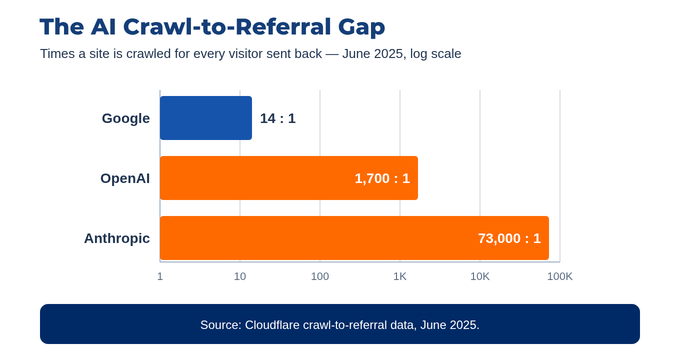
Cloudflare has released its own data to reinforce that feeling. As of June 2025, Google crawled websites about 14 times for every referral click it sent back. For AI companies, the ratio was much worse: OpenAI’s crawl-to-referral ratio was approximately 1,700 to 1, and Anthropic’s was roughly 73,000 to 1.
So on July 1, 2025, Cloudflare escalated its approach. The company announced it was becoming the first major internet infrastructure provider to block AI crawlers by default, requiring explicit permission before any AI system could access content on a new Cloudflare domain.
While Cloudflare’s rationale made sense, their move had some consequences. Businesses that want to be found in AI search results now need to actively opt in, and many haven’t done so and haven’t even realized the need to opt in.
Why This Matters for AI Search Visibility
The way AI answers are generated has changed how people discover websites and content. Tools like ChatGPT and Perplexity don’t just retrieve links; they read and synthesize content from across the web, then surface it directly in a response. To include your business in that response, the AI platform needs to be able to crawl your site.
When Cloudflare blocks those crawlers, your content simply does not exist as far as AI search is concerned. You can’t be cited, mentioned, or included in AI-generated answers, even when your content is genuinely the most relevant on the topic.
You might already know that AI crawlers actually serve two different functions: training (building the underlying model) and retrieval (fetching content to answer a live query). About 80% of AI crawling activity is for training purposes, about 18% supports search and citation, and 2% is direct, on-demand retrieval triggered by user queries. The problem is that Cloudflare’s default blocking doesn’t automatically distinguish between these categories. Enabling it without adjusting per-crawler settings eliminates AI search visibility entirely rather than blocking AI training activity alone, which is all many businesses want or need.
How to Check Your Cloudflare Settings
Cloudflare has a dedicated tool called AI Crawl Control, accessible from the main dashboard. Here’s how to access it and make the necessary changes to enable visibility in AI-powered search:
Check your Block AI Bots settings:
In your Cloudflare dashboard, go to Security Settings and filter by bot traffic. Look for “Block AI Bots” and “Configuration”.
Review AI Crawl Control:
Cloudflare’s AI Crawl Control, found in the main dashboard navigation, gives you a per-crawler view. You can see which crawlers have been requesting access to your content, how many requests they have made, and whether they are currently allowed or blocked (kind of like a simplified log file). From here, you can set individual policies for each crawler.
The crawlers that matter most for AI search visibility include:
- OAI-SearchBot and ChatGPT-User (OpenAI/ChatGPT)
- PerplexityBot and Perplexity-User (Perplexity)
- Claude-SearchBot and Claude-User (Anthropic)
- Googlebot (Google AI Overviews and AI Mode) – this is Google’s normal search crawler, and Cloudflare’s AI-bot blocking doesn’t affect it. Google-Extended, by contrast, only controls whether your content trains Gemini and has no effect on AI search visibility.
If you want to be found in AI search results, the search and retrieval crawlers above need to be allowed (Googlebot being the exception, since it isn’t blocked to begin with). If you want to prevent your content from being used for AI training specifically, you can block training-focused bots while still permitting search and retrieval bots, although this requires per-crawler configuration rather than the blanket toggle.
Training vs. Search Is Not Always Clean
There is a potential trade-off involved if you do want to prevent crawling by AI training bots.
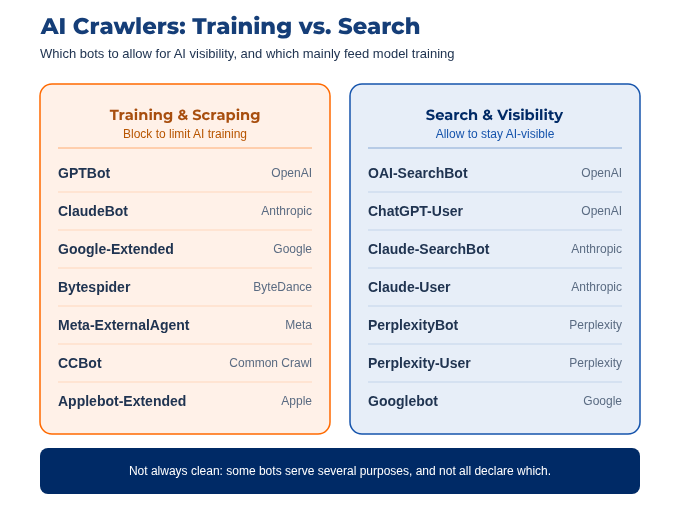
Not all AI companies clearly separate their training crawlers from their search crawlers. Some use the same bot for multiple purposes, and the distinction between “this crawl is for training” and “this crawl is for answering a user’s question” is not always declared or verifiable. Cloudflare has taken steps to require AI companies to state the purpose of specific crawlers, but not everyone has complied yet.
In practice, if you allow crawlers in the interest of AI search visibility, some of that access may also contribute to model training. It’s up to your business to decide whether that trade-off works in the best interests of your customers and your bottom line.
The risk we’ve seen with many clients is not that they made the wrong choice, but that they never made a choice at all. The default changed, and now their sites are invisible in AI search without anyone realizing it.
Should You Block AI Crawlers?
If you run a Cloudflare-protected site and AI search visibility matters to your business, you should audit your settings now. Here’s how:
- Log into your Cloudflare dashboard, look for AI Crawl Control, and review the settings mentioned above.
- Decide on a policy: Do you want full AI visibility, selective visibility (search bots only), or full blocking?
- Apply per-crawler rules rather than relying on the blanket block toggle, which can’t distinguish between bot use cases.
- Verify that your robots.txt document is consistent with your Cloudflare settings. A Cloudflare block happens at the network edge, before a crawler reaches your site, so it overrides robots.txt entirely. Even an Allow directive in robots.txt won’t bring a blocked crawler back.
There’s a serious gap in many businesses’ ability to appear within a vital part of the modern search landscape, but fixing the problem doesn’t have to be hard. If you’re not sure what your current settings are or how they’re affecting your search visibility, Razor Rank can help. Contact us about running a Cloudflare audit (something we’ve done successfully for several clients to date) and make sure you’re appearing where your customers are spending time online.
Razor Rank is a full-service digital marketing agency specializing in SEO, paid media, CRO, and web. We help businesses grow through data-driven strategy and measurable results.