With smart bidding and Performance Max doing most of the driving, it’s common to set a budget at the beginning of the month and let Google decide when to push and when to pull. Both are automation: You hand the platform a target and a budget, and it decides which auctions to enter and what to pay. Generally, the algorithm is decent at figuring it out and you end up getting strong performance for the month. That works, for the most part, so it’s easy to get comfortable: The $5k budget has worked, keep it as is, we’ll add more later if we need to. Easy trap, especially for ecommerce businesses.
Black Friday is historically the strongest sales period of the year for most brands. And yet very few of them plan their spend to match the shape of their revenue.
To be clear, it’s not that anyone isn’t thinking about Black Friday (or other Q4 peaks), but rather, it’s an over-reliance on the tools that work well for the rest of the year. The result is that the budget goes up, but the shape stays the same. Imagine tuning your budget up from $50k to $70k to account for the extra spend just to see Google blow through it in the first two weeks. Now you have to explain to your stakeholders that you need an extra $20k. Tough conversation incoming.
What Q4 Budget Pacing Actually Means
Pacing is just the rate at which your money goes out the door. Two brands can put the exact same $70,000 into Q4 and end up in completely different places, because one of them spread it evenly across nine weeks and the other one loaded it into the weeks their customers were actually buying.
Any spreadsheet can tell you what you can afford. The shape is where the money is made and also the part that rarely comes into play in a planning conversation.
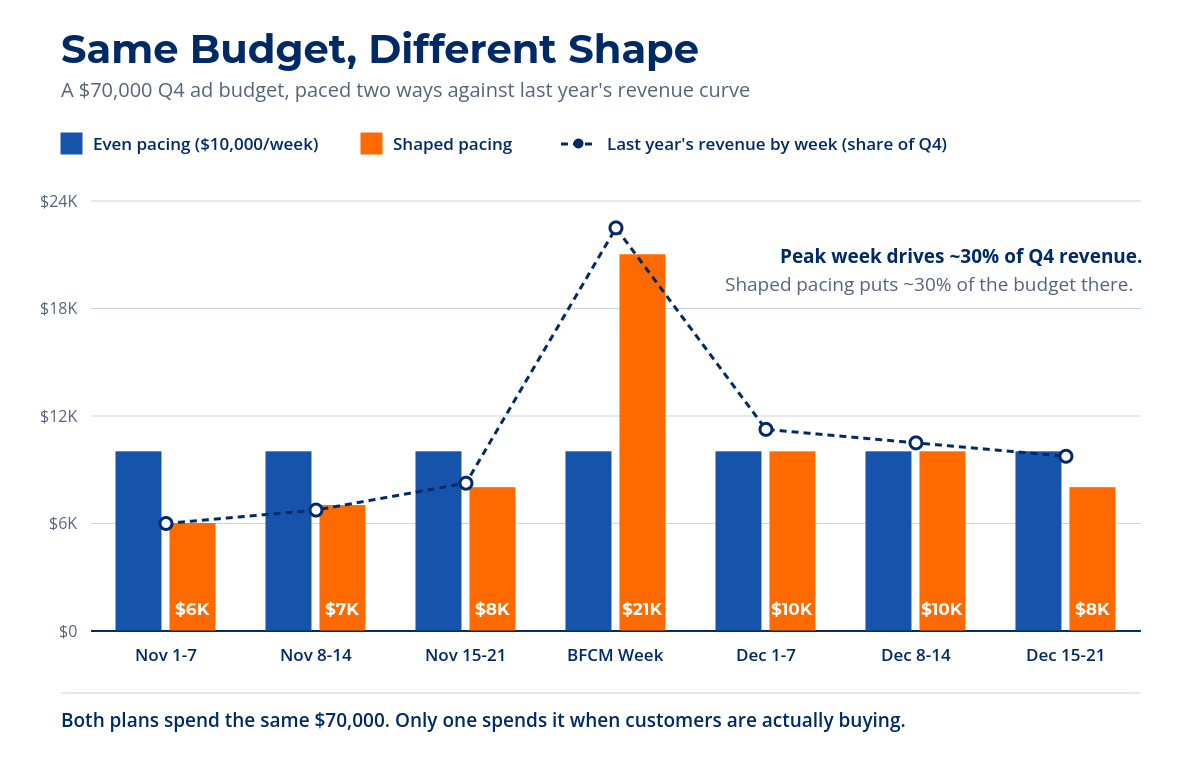
If you take one thing from this piece, remember that your Q4 budget involves two decisions: how much, and when.
Start With Last Year’s Q4 Revenue Curve
If you’re reading this in Q3, you’re right on time. If you’re reading it in November, you’re already behind. Q4 budget planning should be locked by early October at the latest. But the work (pulling last year’s winning campaigns, identifying which SKUs to push, and mapping out price drops) starts now, in the thick of Q3. It’s a merchandising play as much as a media play. Email content, site banners, and promo calendars all dictate how aggressively you can pace your spending and when.
Year-over-year numbers are king. Map those out on a week-by-week graph, present them to your stakeholders, and you’re an advertising Nostradamus. You could go down to day-by-day, but I find that daily variation tends to cloud the bigger picture.
Trust your YoY, but interrogate it. Last year’s numbers have last year’s decisions baked into them. A week that looks like a natural demand spike might have been a closeout, a one-time bundle, or special pricing that isn’t coming back this year. Before you build a budget on top of a curve, make sure the curve is describing your customers and not a promo you’ve since retired.
Mode: Push — How to Plan a Google Ads Budget for Q4
So you understand that you need to be able to tune up or down, but how?
There are two constraints to work around. First, automation needs stability. Big, sudden budget swings can send campaigns back into a learning period, where the system recalibrates and results get noisy for a stretch. Second, Performance Max is not the most nuanced campaign type, and it can take three to four weeks to settle. In Q4, that’s time you don’t have when you need to push from one week to the next.
So you do two separate things in advance: Size the budget and warn the system.
Size the budget before the quarter starts
Take the revenue you want for the period and divide it by the ROAS (return on ad spend) you expect to run at. That’s your spend. That calculation works whether you’re managing the account yourself or approving someone else’s plan.
Say you’re running a $5 ROAS and you did $100k in revenue during Black Friday/Cyber Week last year. You’re projecting 20% growth this year:
$120k target revenue ÷ $5 ROAS = $24k in spend
Now, if you’re planning to push volume even harder and you think you can stretch to $160k by leaning into the peak, but you expect ROAS to dip to $4:
$160k target revenue ÷ $4 ROAS = $40k in spend
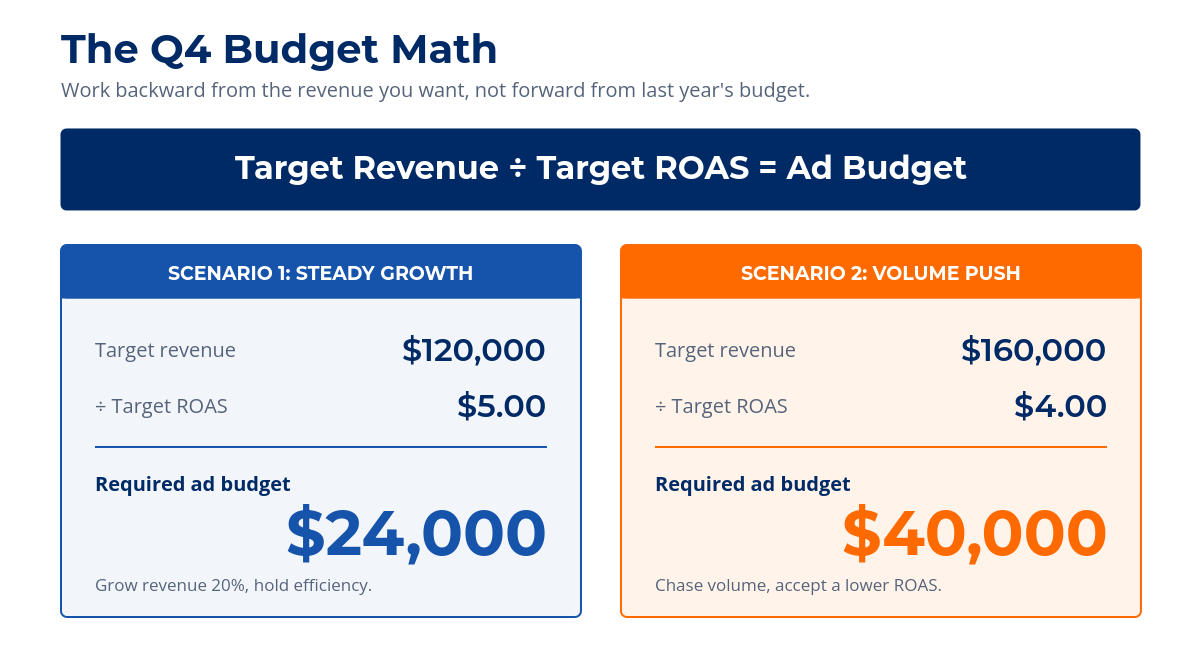
During a volume push you’ll sacrifice some efficiency. That’s fine, but budget for it. The only mistake you can make is accepting a lower ROAS you didn’t plan for and can’t explain after the fact. If you’ve made changes to the site since last year that would move conversion rate in either direction, adjust your ROAS assumption before you run the math.
Tell the platform the peak is coming
Smart bidding sets bids based on how likely a click is to convert, and it learns that from history. During your peak, conversion rates jump faster than the system can work out on its own. Google’s seasonality adjustment lets you tell it ahead of time that conversion rate will run higher than normal for a specific window. Look at last year’s conversion rate in the weeks before the peak, compare it to the peak itself, and use that difference as your input.
Keep in mind that this is a short-window tool. Google recommends it for events of one to seven days and says it loses effectiveness past about two weeks. It’s for Black Friday weekend rather than all of November.
What If You Don’t Have Last Year’s Q4 Data?
If your business is less than a year old, you can’t look back. In that case you have two options: play conservative and keep spend on a rope you extend as needed, or go aggressive from the jump.
That decision depends on your current account ROAS and where you’re sitting relative to benchmarks. If you’re already comfortably above target, you have room to buy volume. If you’re scraping to hit it in a normal month, a peak with higher click costs is not going to rescue you. Either way, review what you can in order to make the most educated decision you can. Your own Q3 trend, your category’s seasonality, and your competitors’ promo calendars will all tell you something.
Shaping Holiday Budget Pacing Across November and December
Once you have the number, shape it. Lighter in early November, heavier into Black Friday week, then read the December data and adjust. Most brands under-plan the back half because shopping intent doesn’t switch off on Cyber Monday, and the run-up to shipping cutoffs is its own peak with its own urgency.
Whatever curve you land on, get it in front of your stakeholders before the quarter starts, with last year’s revenue graph sitting right next to it. A plan that shows when the money goes out is a very different conversation than one that shows only how much. You go from asking for more budget in week two to having already told everyone what week two was going to look like.
If you need help planning for Q4, come talk with the experts at Razor Rank. We’re here to help you budget for next quarter, next year, and beyond.
Razor Rank is a full-service digital marketing agency specializing in SEO, paid media, CRO, and web. We help businesses grow through data-driven strategy and measurable results.