If your Facebook ads were bringing in steady leads a few months ago and now they’ve slowed to a trickle, you might have gone searching for answers and/or developed a few theories of your own. If what you’ve found isn’t adding up, keep reading.
For most advertisers, the first instinct is to look at the targeting: tighter interests, a fresh lookalike audience built from your existing customers, a separate ad set for each type of buyer, or an age cap so the budget stops going to people who aren’t likely to buy. (An ad set is the layer where you choose who sees an ad and how much you spend; your individual ads sit inside it.)
A few years ago, targeting concerns were a reasonable place to start. Today, they’re usually not the culprit, and fixating on them can easily eat up a whole quarter while the real problem is happening somewhere else in the account.
(A quick note on names: Facebook and Instagram ads are both bought through Meta Ads Manager, with Meta being the parent company of both. Almost nobody outside the industry calls them Meta ads, so we’ll use “Facebook ads” where it makes sense in this article and “Meta” when we mean the company or its systems.)
If you’re also wondering how your ad account itself should be organized, we’ve written a separate guide to Meta Ads account structure to go along with this one.
Why Changing Your Targeting Doesn’t Fix Facebook Ads Anymore
Meta decides who sees your ad in two steps. First, a system called Andromeda sorts through tens of millions of possible ads and narrows them down to a few thousand for each potential viewer. Then a second set of models predicts which of those ads that viewer is most likely to respond to.
The targeting controls advertisers used to lean on have gotten a lot looser. Meta can now show your ad to people outside the audience you specify if it expects better results, and that automatic audience setting is switched on by default. You can still put firm limits on location, minimum age, and exclusions when there’s a real business reason for them, like a law firm that’s only licensed to practice in one state. Pretty much everything else you enter is treated as a suggestion.
So the question has shifted from “who should we target?” to “what should we say, and who are we saying it to?” because the message you give to Meta now does a lot of the targeting for you. Here’s how we’ve seen that work in real accounts:
- Different messages reach different people. An ad about getting rear ended at a stoplight and an ad about slipping in a grocery store aisle will end up in front of different people, even when the two ads are in the same ad set. There’s some overlap, but Meta makes different guesses about the people those two ads will speak to.
- Small tweaks aren’t worth as much as you think. If you upload five versions of the same photo with five different headlines, Meta has far fewer real options to work with than if you’d given it five ads that each say something different.
Five Things to Check Before You Blame Creative Fatigue
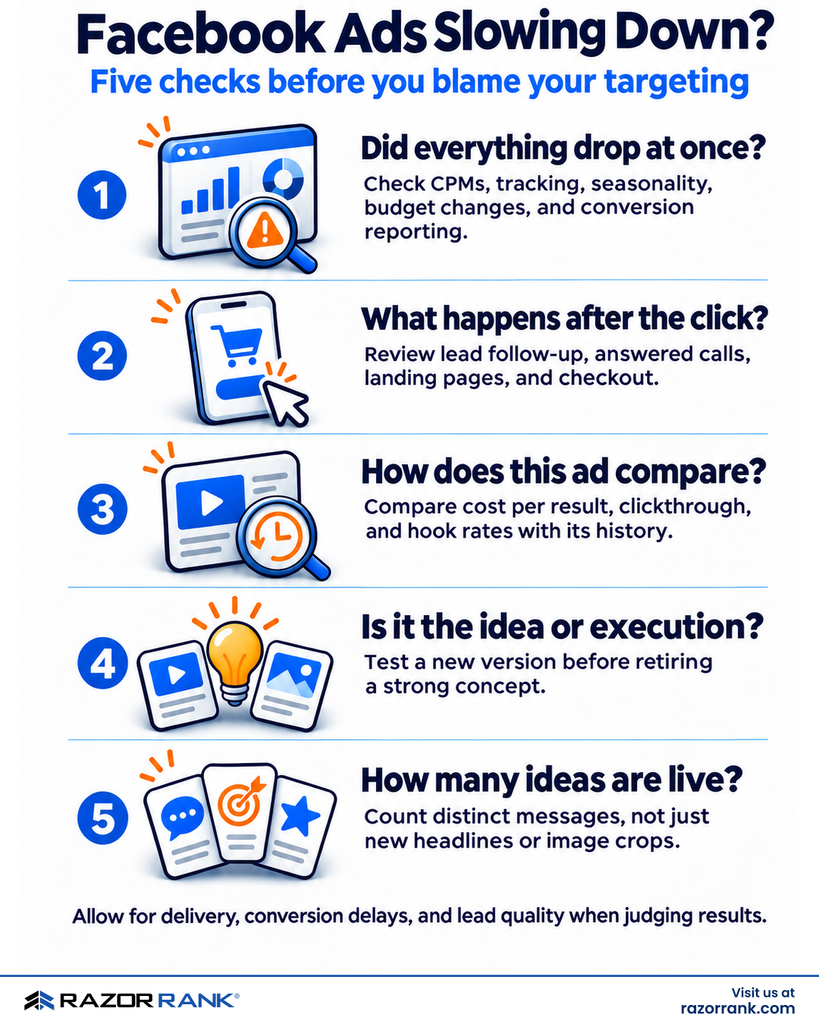
Creative fatigue (when someone has seen an ad so many times they stop responding to it) is real, but it also gets overly blamed for underperformance of ads. In the audits we perform at Razor Rank, the cause of an ad underperforming usually turns out to be something else, so we recommend going through these five checks before you decide your ads are just worn out:
1. Did everything drop at the same time?
If every ad in the account stopped performing at once, the creative probably isn’t the cause, since it’s unlikely creative fatigue kicked in for all of them in the same week. Look instead for a spike in CPM (the cost to show your ad to a thousand people, which increases when more advertisers compete for the same audience), a seasonal dip, broken tracking, a budget change, or a change in how Meta credits conversions.
2. What happens after someone clicks?
If you’re generating leads but no conversions, look at what happens once a lead comes in. A lack of follow-up makes every ad look like it’s performing worse in your CRM, and if a lead calls you five times and just gets a voicemail, a new ad won’t fix that. If you sell online, check your landing pages and checkout process. When clicks are coming in steadily but sales are falling off, the problem is usually somewhere on the website.
3. How does the ad compare against its own history?
Meta will put a creative fatigue flag in the Delivery column once an ad’s cost per result climbs too high above where it used to be. We treat that flag as confirmation of something we’ve usually spotted already, because by the time it shows up, the cost has often doubled.
What we watch is each ad’s cost per result compared with its own recent history, along with clickthrough rate and hook rate dropping while CPMs stay flat. (Hook rate is the share of people who keep watching a video past the first few seconds.)
Frequency, which is the average number of times one person has seen your ad, is also something to look out for. You’ll find plenty of articles that give a specific number as a “danger zone”. We don’t use one, because a frequency of 4 in a small, local market is different from a 4 spread across the whole country.
Spend can also be misleading, for a couple of reasons. An ad whose spend is falling isn’t necessarily causing fatigue; Meta may have just not given it enough delivery to prove anything either way. On the other hand, an ad that’s spending more than you can afford needs your attention right away, whether it’s been moving in that direction for weeks or it’s just started.
4. Is it the idea, or the way it was made?
When an ad starts to fail, it’s rarely obvious what wore out. It could be the message, the first few seconds of a video, the person on camera, or the image itself. So before you retire something you’re confident is a strong idea, try a new version of it. If performance comes back, the idea still has life in it. If the new versions fade quickly too, it’s probably time to move on.
We don’t use a standard waiting period in situations like these. We look at spend, how many conversions the ad produced, how long results take to show up, the quality of the leads or orders that came through, and which way the account is trending overall. Assessing a failing ad usually takes at least a week, or sometimes two on smaller lead-generation budgets where it takes a while to find out whether a lead was any good. The one thing we try hard to avoid is pausing a strong ad because of a bad few days.
5. How many different ideas are you using at a time?
When we audit an account, one of the first things we do is count how many separate ideas are live. Most accounts have fewer ideas than the number of ads suggests, and an account running twelve versions of one message is going to fatigue no matter how often you switch out the headline. If that sounds like your account, the rest of this article is mostly about fixing it.
What Counts as a “Different” Facebook Ad?
When we review an account, we sort every ad into one of three buckets:
- A concept is the customer problem, objection, benefit, proof point, or offer the ad is talking about, along with the way it’s expressed.
- An execution is one version of that concept, like a different format, a different opening, or a different person on camera.
- A variation is a small change inside an execution, such as a new headline or a tighter crop on the photo.
What makes a concept distinct is what it says. Three talking head videos can be three different concepts if one answers “I can’t afford a lawyer,” one answers “the adjuster already made me an offer,” and one answers “I don’t know if I even have a case.” Three eye-catching ads that all say “call us after an accident” are really one concept dressed up three different ways.
How you express an idea is still important. An unexpected opening, a visual metaphor, an ad that looks like a text message thread or security camera footage, or a switch in whose point of view you’re seeing can all be attractive to someone who’d scroll right past a duller version. We just make sure there’s a clear message underneath the format, because even a clever format on its own will eventually get old.
Meta can generate a fair amount of variation by itself through its automatic creative enhancements and multiple text options. It can’t tell which problems your customers care about most or what makes them hesitate before they call, though, so that part still has to come from you and your team.
How Many Facebook Ads Should You Run at Once?
It’s easiest to think of ad refreshes as a production schedule. You want something new in the works at all times so it’s ready to go when an ad starts to fail, which works a lot better than always swapping ads out on a set date. These are the starting ranges we use on the accounts we manage at Razor Rank:
| Monthly Meta Spend | Different Concepts Running | New Concepts Per Refresh | Typical Refresh Cycle |
|---|---|---|---|
| Under $3K | 3 to 4 | 1 to 2 | Every 3 to 4 weeks |
| $3K to $10K | 4 to 6 | 2 | Every 2 to 4 weeks |
| $10K to $30K | 6 to 10 | 3 | Every 2 weeks |
| $30K and up | 10 or more | 3 to 5 | Every 1 to 2 weeks |
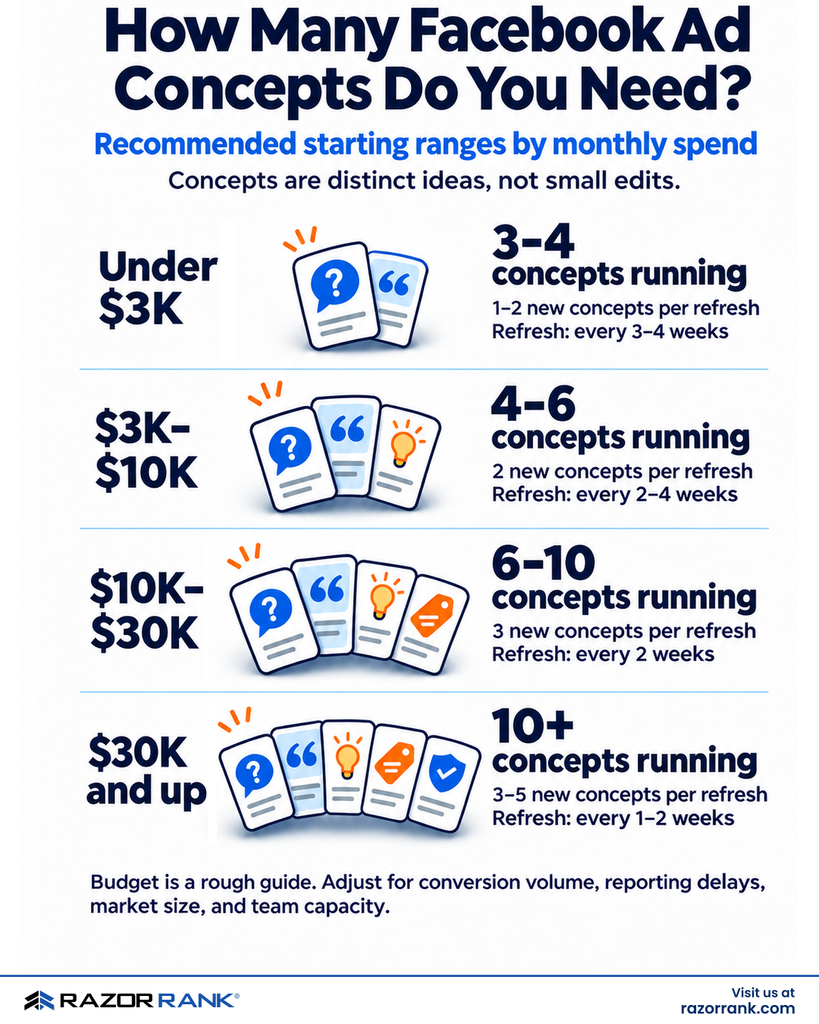
The budgets above are rough stand-ins for how we actually set our numbers, which includes how many conversions the account produces, how long they take to show up, how big the client’s market is, and how much creative the client’s team can realistically make or approve. A $3,000 account selling $15 products can test way more ideas than a $3,000 account generating $300 qualified leads, simply because it gets so many more results to judge by.
On one of our clients’ lead generation accounts running a single ad set at roughly $100 a day, we keep three to six ads live, built on three or four concepts, and add new ones on a schedule.
So why not just run more ads? Mostly because you need enough evidence to judge each one. Meta won’t split your budget evenly across ads, so on a smaller budget, most of them get very little delivery, and it’s hard to judge an idea that only produced a handful of results. More creative also stops helping once the new ads stop being substantially different from the old ones, once your team can’t keep up with ad reviews and approvals, or once quality starts slipping in favor of hitting a number.
Bigger production budgets aren’t necessarily the answer, either. A simple video shot on a phone often performs better than an expensive shoot, because it looks like everything else people are scrolling through in their feed.
Where to Find New Facebook Ad Ideas
Most of our best ad ideas start with something a customer said, did, or worried about out loud. Here are the places we look:
- Intake and sales calls. Listen to what customers say in the first minute of the call. For personal injury law firms, we hear things like “I didn’t think I needed a lawyer” or “the adjuster already called me.”
- CRM and lead data. Look at which situations turn into signed cases or repeat buyers, and at the reasons people give for saying no, since those tell you who your ads should avoid targeting.
- Search terms and reviews. These show how people describe the problems they’re trying to solve in their own words, and they’ll often reveal uses for your product or service that you wouldn’t have thought to advertise.
- Conversations with stakeholders. Ask what makes this business different from the one down the road: the owner’s professional background, how long they’ve been doing it, or a service that nobody else in the market offers. Those are the angles competitors can’t duplicate.
- Organic posts and comments. A post that did well organically is a good candidate for paid, and the comments give you a free list of objections.
Turning “we need three new ideas” into three briefs
- Find the customer moment. Skip broad categories like “car accident lawyer” and think about where the customer’s mind goes right after: a repair estimate bigger than a paycheck, medical bills piling up on the kitchen table, or the adjuster calling before they’ve even seen a doctor.
- Give each idea its own problem, objection, or proof point. That way you end up with three separate ideas to test, and you give Meta three options to work with.
- Spread them across risk. We like to brief one safe idea, one that’s a bit more of a stretch, and one bold swing. The bold one is where surprise winners tend to come from, as long as it gets enough delivery to judge.
- Skip the category clichés on the bigger swings. Gavels and shattered windshields for legal and flat-lay product shots for ecommerce are safe choices, and that’s exactly why every competitor is already using them.
- Write the brief. Include the customer moment, the message, the opening (the first three seconds of video or the first 125 characters of text), the visual, the formats, any compliance notes, and what you’d learn if it wins.
How to Review Your Facebook Ads Each Week
This is where two separate jobs sometimes get confused. Running several ads together in one ad set is how you operate the account day to day, and Meta will keep moving budget toward whatever it predicts will perform best. But that isn’t a fair comparison between ads, since they get different amounts of spend and reach different people. When you want to answer one specific question, like whether a new angle beats your current best ad, that’s what a designed test is for.
The weekly check
- Check delivery first. Look for errors, rejected ads, and broken links. We’ve found formerly top-performing ads sitting dark for days because of a bad URL.
- Look at how spend is distributed. Which ads haven’t had enough delivery to judge yet?
- Compare cost per result by ad over 7 and 30 days, against the account average. Keep in mind that an ad with a higher average cost can still be the most efficient place for your next dollar to go. Meta calls this the breakdown effect.
- Break it down by placement, meaning where the ad shows up. Your Facebook campaigns also run across the Instagram feed, Stories, and Reels unless you’ve excluded them, and you don’t want a square image awkwardly stretched into a vertical slot. In that case you can usually just make a properly sized version, so you don’t have to switch that placement off.
- Check what happened downstream. How many leads signed, or what were the orders worth?
- Decide. Figure out which ads stay on, which need new versions, and which can be retired, then brief the next round based on what’s working.
Launch in batches
We launch new ads together on a set day. Meta’s documentation says adding ads is a significant edit that can send an ad set back into its learning period, which is where performance bounces around while the system recalibrates. On one client account, we traced a dip that was showing up every single month back to new creative being added partway through the month, over and over. Now new ads go in paused, get reviewed, and get switched on together as a batch.
When you want a fair comparison, Meta’s creative testing feature splits the budget evenly across a small set of ads for a fixed period, so a new idea doesn’t get crowded out by one you’ve had going for months. Even then, we wait to see a winner hold up once it goes back into normal delivery before we really call it a winner.
What to Do When You Can’t Produce Enough Creative
This is where most accounts get stuck, whether the ads are run in-house or by an agency. There are a lot of places where the process can bottleneck, like new photos and video not getting produced as often as they’re promised or having to deal with long approval cycles. When that happens, one strong ad is forced to carry the whole account for months with nothing lined up behind it. When we audit the most stressed accounts, the targeting and the structure are often fine, but the trouble is that there’s one good ad and nothing else in the works.
Here’s what tends to help:
- Write briefs for ideas that aren’t calendar-dependent. A clever visual metaphor doesn’t require a team member to clear an afternoon and get on camera.
- Use AI production carefully. Follow Meta’s current disclosure requirements and, if you’re in a regulated field, your own industry’s rules too; some state bars require labels like “Dramatization.” Never imply that a “person” created with AI is a real customer. Also know where the tools fall short: The video models we’ve tried can’t render a believable car crash, so we imply the impact instead of showing it.
- Pull from what you already have. Old footage, YouTube videos, and strong organic posts are all good sources of creative. If you run an organic post as an ad using its original post ID, it keeps the likes and comments it already earned.
- Put the cadence in writing. Agree up front on how many new ideas will go live each month, who’s supplying what, and how long approvals should take. For an in-house team, this is the single most useful thing you can do for yourselves, because it turns “we should really make some new ads” into a plan with a timeline.
Does This Work the Same for Ecommerce and Lead Gen?
Between ecommerce and lead gen, the pace at which you refresh ads is more similar than you might expect. It depends more on conversion volume, how long results take, and what your team can produce than it does on what industry you’re in. The biggest difference is in how you judge the results. Take, for example, two of our most common verticals:
| Legal Lead Generation | Ecommerce | |
|---|---|---|
| How to judge an ad | Signed cases, which can take weeks to show up | Purchases, order value, and new customers |
| Main constraints | State bar rules, results disclaimers, dramatization labels | Inventory, seasonality, licensing, order value goals |
| Fatigue risk | Small local areas burn through an audience fast | Bigger budgets burn through ideas faster |
In legal lead generation, you’ll usually run with fewer ideas and give each one longer to prove itself. Just make sure you’re not optimizing for whoever fills out the form fastest when what you want is whoever becomes a client. Sending your CRM data back to Meta helps, but only once the campaign’s goal is set up to use that data. Signed cases are often too few and too slow to optimize toward directly, so a qualified lead stage is usually more practical. Either way, track your bottom line, the signed cases, and judge your ideas based on them.
Ecommerce gives you faster analysis and more room to test. Product catalog ads handle a lot of the product-level variation for you, which frees up your concepts to focus on who the product is for and why they buy it. Timing is also more important in ecommerce, because if your best-seller peaks in December, its ideas should be briefed in October.
Where to Start
If your ads have slowed down, start by ruling out the account itself before you blame the creative. Once you’ve done that, count how many different ideas you have running, and then check whether anything new is in production behind them. In most of the accounts we take on, we find that one ad is doing all the work, the rest are close copies of it, and nothing new has been queued up to take its place.
You can do all of this yourself using the steps above, but if you’d like a second set of eyes on it, reach out to Razor Rank and we’ll tell you what we find in your account.
Razor Rank is a full-service digital marketing agency specializing in SEO, paid media, CRO, and web. We help businesses grow through data-driven strategy and measurable results.